Kimi K2.8 Preview: Million-Token Context for Everyday Coding
Explore Kimi K2.8 Preview, its 1M context, reasoning levels and kimi-for-coding model ID. See how to connect Kimi Code to APIMaster's available models.
Published 2026-09-13
Kimi K2.8 Preview launched in Kimi Code on September 11, 2026. Moonshot says its overall performance approaches K3, with stronger coding and agent capabilities than K2.7 Code. It supports 1,048,576 tokens of context, image and video input, and low / high / max reasoning effort. All Kimi Code membership tiers can access its 1M context. The Kimi Code model ID remains kimi-for-coding.
At APIMaster.ai, we see the practical appeal: more project context and adjustable reasoning for routine development. This guide explains the update and how to connect Kimi Code to our model marketplace. As checked on September 13, APIMaster's public pricing catalog lists kimi-k3, kimi-k2.6 and kimi-k2.7-code, but does not explicitly list K2.8 Preview. Check the live marketplace for current availability before choosing a model.
What is new in Kimi K2.8 Preview?
K2.8 Preview upgrades Kimi Code's existing kimi-for-coding route. Users already calling that ID through Kimi Code do not need to rename their model configuration. The official release notes describe improved coding, agent capability and thinking efficiency compared with K2.7 Code.
The biggest access change is the context window: every Kimi Code membership tier can use up to 1M tokens with K2.8 Preview. K3's 1M option still requires Allegretto or above. QbitAI's September 12 report also says K2.8 Preview is available in Kimi Work; the technical settings in this guide come from the Kimi Code documentation.
This is a preview release. The announcement does not provide new benchmark scores or a reproducible K2.8-versus-K3 evaluation. "Approaches K3" is Moonshot's assessment, not an independent APIMaster test result.
Kimi K2.8 Preview vs K3: what changes for developers?
The following comparison applies specifically to Kimi Code's official service, using its model configuration documentation.
| Feature | K2.8 Preview | K3 in Kimi Code |
|---|---|---|
| Model ID | kimi-for-coding |
k3 or k3-256k |
| Positioning | Code completion and routine development; performance described as approaching K3 | Flagship coding model for demanding work |
| Context | 1,048,576 tokens | 1,048,576 for k3; 262,144 for k3-256k |
| Membership access | All tiers, including the 1M window | Moderato or above; 1M requires Allegretto or above |
| Reasoning effort | low, high, max; default max |
low, high, max; default high |
| Visual input | Images and video | Images and video for k3; images only for k3-256k |
Kimi Code also retains kimi-for-coding-highspeed, which its documentation identifies as K2.7 Code HighSpeed. It is a separate route, not a high-speed K2.8 variant.
For teams, the useful comparison is cost per completed task: can a model fix the issue, pass the tests and finish within an acceptable time? Start by evaluating K2.8 on bounded changes and code completion, then compare harder repository work with K3. The preview announcement alone cannot establish which model wins on your codebase.
What does a 1M context window make possible?
A larger window can keep more source files, specifications, test output and conversation history together. That is useful when a change spans several packages or when a coding assistant must cross-reference implementation details with a long design document.
It also supports visual workflows: screenshots can help explain a UI defect, while video input can provide context for a recorded interaction. Actual attachment formats and limits depend on the client and route.
1M is a context limit, not a promise of perfect recall, unlimited usage or one million output tokens. Relevant context still matters. We recommend starting with the files needed for the task, adding more only when they help, and measuring token use and completion quality as the session grows.
How do reasoning effort and model routing work?
K2.8 Preview supports three reasoning levels in Kimi Code:
low: a useful starting point for narrow edits and straightforward questions.high: a level to evaluate for debugging and changes involving several constraints.max: the K2.8 default; worth comparing on difficult reasoning tasks against its additional time and token use.
These are evaluation suggestions, not measured speed or quality guarantees. Kimi Code's documentation also recommends a new conversation when changing models because switching invalidates the existing context cache.
There is an important routing detail: in Kimi Code, turning thinking off for either K3 or K2.8 Preview routes the request to K2.8 Preview without thinking. A request configured as K3 can therefore be served by K2.8 under this documented condition.
When comparing models, record the provider, endpoint, model ID, thinking setting and test date. The returned model name or a model's own claim about its identity is not sufficient proof of which model served a request. This Kimi Code routing rule does not automatically describe Moonshot's general API or every third-party gateway.
What is the Kimi K2.8 Preview API price?
The two official Kimi Code pages reviewed for this article establish access and capabilities, but do not publish a separate K2.8 Preview input/output token price table. Access through a membership tier is different from pay-as-you-go API pricing. A 1M context entitlement also does not mean unlimited free tokens.
Kimi Code's official model ID is kimi-for-coding; the display name "K2.8 Preview" is not a substitute API ID. Do not assume a gateway accepts that ID or that an older Kimi listing has automatically become K2.8.
For APIMaster, use the model ID and live route prices shown in our marketplace. Review the applicable account billing rate, available quota and usage records before estimating production costs. We are not announcing a K2.8 price or confirmed K2.8 availability on APIMaster in this article.
How to use Kimi Code with APIMaster.ai
Kimi Code is a coding client that can also use third-party providers. You can connect it to APIMaster today and select models available to your API key, independently of a Kimi Code model subscription.
- Create an APIMaster account, review the model marketplace, and add balance as needed.
- Generate an API key in the APIMaster console.
- Start Kimi Code and enter
/provider, then choose Custom registry (api.json). - Enter
https://apimaster.ai/kimi/registry.jsonas the registry URL and your APIMaster API key as the Bearer token. - Select a model from the apimaster provider tab and send a small coding task. Check the result and usage in the console before scaling up.
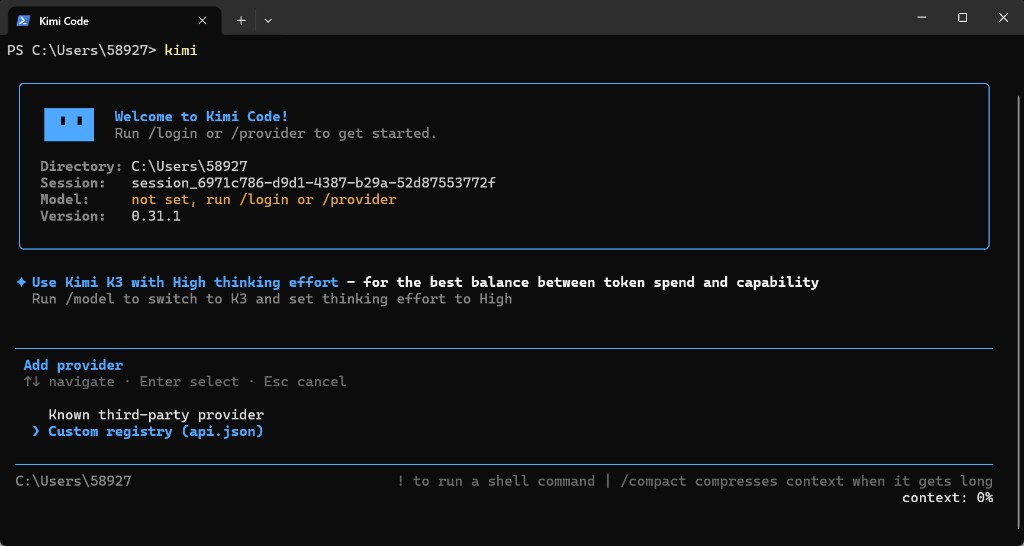
Provider setup screenshot from our Kimi Code CLI guide, captured with version 0.31.1. It illustrates the connection workflow, not K2.8 availability.
You can also import the registry from a terminal after setting APIMASTER_API_KEY in your local environment:
kimi provider add https://apimaster.ai/kimi/registry.json --api-key "$APIMASTER_API_KEY"
The registry lists coding-compatible models according to your key's permissions. If K2.8 is not explicitly listed, choose a currently supported model rather than inventing a K2.8 model ID. See our Kimi Code setup guide for the full walkthrough and Kimi K3 introduction for an existing Kimi option.
Why evaluate your coding models through APIMaster?
We bring model selection, live route pricing, API keys and usage tracking into one place. You can compare available Kimi models with other model families through a common API integration, then use the same account in supported coding clients.
Start with a small, repeatable task: a bug fix with a failing test, a function that needs coverage, or a documented change across several files. Compare correctness, time to completion, tool behavior and total cost. Our API key tester can help check connectivity; a successful request alone does not establish model identity or 1M-context support.
FAQ
What is Kimi K2.8 Preview?
It is Moonshot's September 11, 2026 Kimi Code model update, positioned for routine coding and agent tasks. It supports 1M context, images, video and three reasoning levels. Moonshot describes overall performance as approaching K3, without publishing new benchmark scores in this announcement.
What model ID should I use for K2.8 Preview?
In Kimi Code's official service, use kimi-for-coding. The ID stayed the same when the underlying model upgraded. On APIMaster or another gateway, copy the exact ID from that provider's current model listing.
Is the 1M context available to all Kimi Code members?
Yes, for K2.8 Preview, according to Kimi's documentation. This is a maximum context entitlement subject to the service's quotas, not unlimited free API usage. K3's 1M option still requires Allegretto or above.
Does disabling K3 thinking select K2.8 Preview?
Yes, within Kimi Code: K3 and K2.8 requests with thinking disabled are served by K2.8 Preview without thinking. Do not generalize this rule to other endpoints without checking their documentation.
Is K2.8 Preview already available on APIMaster?
Our September 13, 2026 public catalog check did not find an explicit K2.8 Preview listing. It did find kimi-k3, kimi-k2.6 and kimi-k2.7-code. Check the live marketplace for updates; an older model name alone does not confirm a K2.8 upgrade.
Can I use APIMaster in Kimi Code now?
Yes. Import https://apimaster.ai/kimi/registry.json with an APIMaster API key and choose a model available to that key. Third-party API usage is billed through APIMaster rather than through the Kimi Code membership entitlement.
Sources and verification date
- Kimi Code: September 11 release notes.
- Kimi Code: model specifications, reasoning and routing.
- QbitAI, September 12, 2026: "Kimi突发K2.8:性能逼近K3,百万上下文全员开放". Used for the reported Kimi Work rollout; technical claims were checked against the official pages above.
- APIMaster public pricing catalog, checked September 13, 2026. Availability can change after publication.
Start building with APIMaster.ai
K2.8 Preview makes long-context coding worth another look. Bring a real task to APIMaster.ai, compare the currently available routes, and connect your chosen model to Kimi Code. Create your APIMaster account to get an API key and start with your first coding workflow.