
GPT-Image-2.5 API: Model ID, Pricing, Access and Examples
Compare GPT-Image-2.5 Flare and Sunburst, official API pricing, APIMaster image prices, and Python examples for image generation and editing.
Published 2026-09-09
GPT-Image-2.5 is available in the API as two models: gpt-image-2.5-flare and gpt-image-2.5-sunburst. OpenAI announced their API release on September 8, 2026. Both generate images and edit reference images; Flare targets fast everyday production, while Sunburst emphasizes editing precision. This guide explains the model IDs, official token pricing, APIMaster's separate per-image pricing, and practical generation and editing requests.
Current GPT-Image-2.5 API status
Checked September 9, 2026: both models are documented by OpenAI and available through APIMaster. Use the complete model ID, including -flare or -sunburst.
| Question | Current answer |
|---|---|
| Official API model IDs | gpt-image-2.5-flare, gpt-image-2.5-sunburst |
| Official API availability | Released September 8, 2026, through the Image API and the Responses API image generation tool |
| Generate or edit? | Both support image generation and editing |
| Official pricing | Token-based; both models have the same published token rates |
| Direct OpenAI access | An OpenAI API key and an eligible API organization; organization verification may be required |
| APIMaster availability | Both models are live, with generation and reference-image editing tested |
| APIMaster displayed route prices | 1K: $0.25; 2K: $0.30; 4K: $0.60 per image, for either model |
Sources: OpenAI release record, image generation guide, official pricing, and the live APIMaster marketplace.
What is GPT-Image-2.5?
OpenAI's Introducing ChatGPT Images 2.5 describes improvements in detail, lighting, textures, reference-image fidelity, and following editing instructions across multiple turns. For developers, that makes the family relevant to product photography, campaign variations, creator content, and workflows that repeatedly update an existing asset.
The distinction between ChatGPT and the API matters. ChatGPT Images 2.5 is the product experience; Flare and Sunburst are the API model choices. Sketch, templates, comments placed on images, and prompt sharing are ChatGPT features. Their appearance in the announcement does not make them API request parameters. Likewise, a ChatGPT subscription is separate from OpenAI API billing.
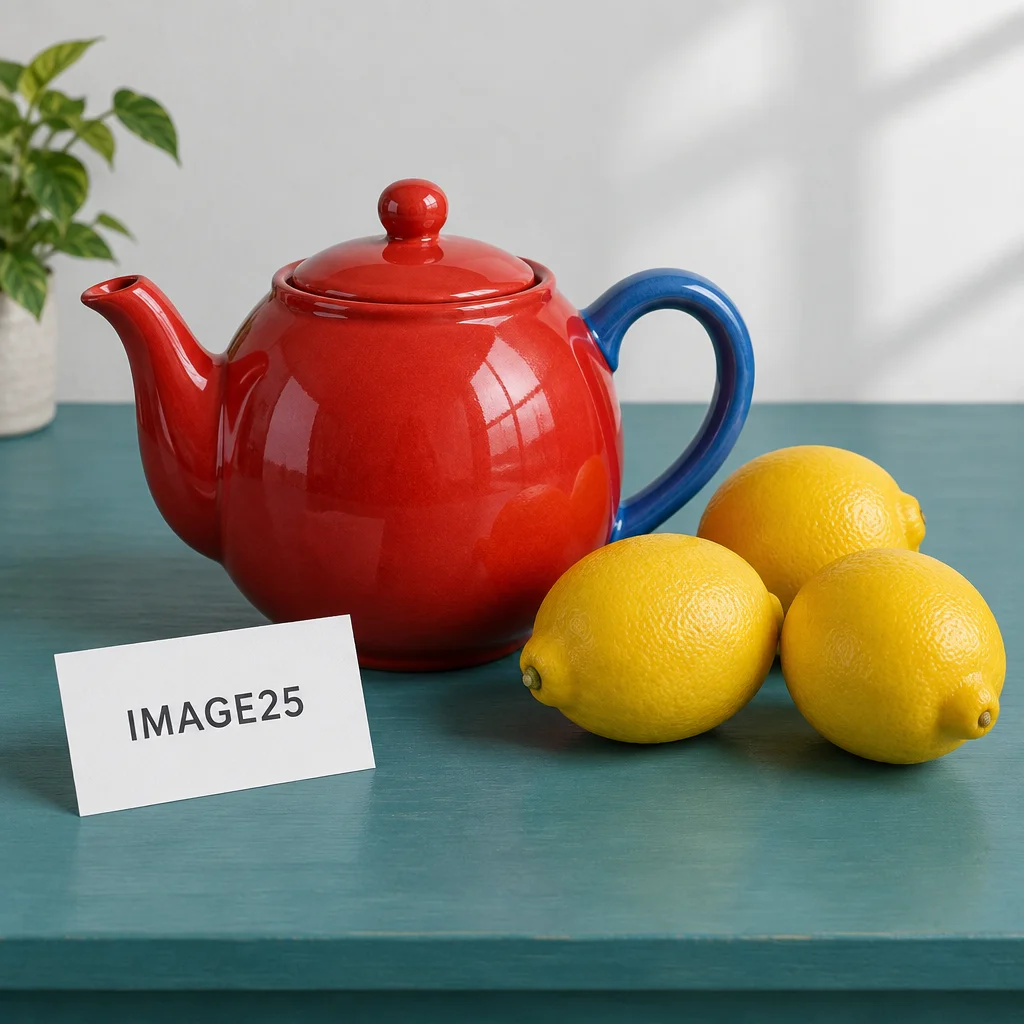
APIMaster generation sample, September 9, 2026. This illustrates one output from a test prompt, not a comparative quality benchmark.
GPT-Image-2.5 API model ID and variants
| Choice | Exact model ID | Where to start |
|---|---|---|
| Flare | gpt-image-2.5-flare |
Everyday image generation, rapid iteration, creator content, and higher-volume applications |
| Sunburst | gpt-image-2.5-sunburst |
Detailed editing, polished product imagery, and campaign assets that need tighter visual control |
OpenAI positions Flare as the default for most applications and reports 50% lower latency than GPT-Image-2, with improved image quality. That is OpenAI's launch claim, not an APIMaster latency measurement or a guarantee for every prompt. OpenAI describes Sunburst as offering additional precision with longer generation times.
The official guide lists low, medium, high, xhigh, and max quality settings for both models, with auto available for automatic selection. These are settings within each model; Flare and Sunburst are not quality values. Do not shorten the model to an undocumented gpt-image-2.5 alias.
For the direct Image API, put the image model ID in the request's model field. For OpenAI's Responses API, the top-level model is a supported mainline model; the image model belongs in the image generation tool's model field. The APIMaster examples below cover the tested Image API routes.
GPT-Image-2.5 API pricing
OpenAI official token prices
The official pricing page lists these standard prices in USD per one million tokens, identical for Flare and Sunburst:
| Token category | Input | Cached input | Output |
|---|---|---|---|
| Text | $5.00 | $1.25 | Not listed |
| Image | $8.00 | $2.00 | $30.00 |
There is no universal official flat price of $0.25 per image. Total cost depends on text input, reference-image input when editing, and image output tokens. Quality, dimensions, and the chosen model can affect token consumption. OpenAI explicitly notes that equal token rates do not imply equal cost per image.
For an illustrative calculation, a request using 100 uncached text input tokens and 10,000 image output tokens, with no reference image, costs:
(100 / 1,000,000 x $5) + (10,000 / 1,000,000 x $30) = $0.3005
Those token counts are assumptions for the calculation, not a measured 1K, 2K, or 4K price. For an edit, add image input charges. Use the returned usage and the official image cost guidance for your workload. Responses API requests also incur the mainline model's token charges.
APIMaster per-image route prices
APIMaster currently displays the following separate channel prices, checked September 9, 2026:
| Model | 1K / image | 2K / image | 4K / image |
|---|---|---|---|
| GPT-Image-2.5 Flare | $0.25 | $0.30 | $0.60 |
| GPT-Image-2.5 Sunburst | $0.25 | $0.30 | $0.60 |
These are APIMaster route prices, not OpenAI's token rates or official per-image estimates. Check the live marketplace and your selected account group before budgeting: channel supply, prices, and account multipliers can change. At the displayed base price, 100 images in the 1K tier would be $25 before any account-specific adjustment.
The resolution names are channel tiers, not a promise of a fixed square dimension. In our September 9 square-output tests, 2K returned 2048x2048 and 4K returned 2880x2880. Check the returned image dimensions when your application requires an exact pixel size.
How to call GPT-Image-2.5 API
Direct OpenAI: generate an image
Install the current Python SDK with pip install -U openai and set OPENAI_API_KEY in your environment. This example follows the official Image API guide; it uses OpenAI's default API endpoint and billing.
import base64
from pathlib import Path
from openai import OpenAI

client = OpenAI()
result = client.images.generate(
    model="gpt-image-2.5-flare",
    prompt="A studio product photograph of a red ceramic teapot on a teal table.",
)
Path("generated.png").write_bytes(base64.b64decode(result.data[0].b64_json))
Use gpt-image-2.5-sunburst to try the other model. OpenAI documents /v1/images/generations for generation and /v1/images/edits for editing. Your organization may need verification; consult your OpenAI project for access and rate limits.
APIMaster: generate an image
Create a key in the APIMaster console, ensure the account has available credit, install requests, and set APIMASTER_API_KEY. This uses APIMaster's tested channel schema: size is an aspect ratio, and resolution selects the pricing tier. These channel conventions should not be copied into a direct OpenAI request.
import os
import requests

response = requests.post(
    "https://apimaster.ai/v1/images/generations",
    headers={"Authorization": f"Bearer {os.environ['APIMASTER_API_KEY']}"},
    json={
        "model": "gpt-image-2.5-flare",
        "prompt": "A studio product photograph of a red ceramic teapot on a teal table.",
        "size": "1:1",
        "resolution": "1K",
        "n": 1,
    },
    timeout=720,
)
response.raise_for_status()
print(response.json()["data"][0]["url"])
The synchronous route returns the generated image URL after completion. Download the result promptly for durable storage. This example intentionally omits advanced quality and mask options whose availability depends on the channel.
APIMaster: edit an uploaded reference image
Place your reference image at reference.png, then send a multipart request to /v1/images/edits. Keep the image file open until the request finishes; requests sets the multipart content type and boundary automatically.
import os
import requests

with open("reference.png", "rb") as image:
    response = requests.post(
        "https://apimaster.ai/v1/images/edits",
        headers={"Authorization": f"Bearer {os.environ['APIMASTER_API_KEY']}"},
        data={
            "model": "gpt-image-2.5-sunburst",
            "prompt": "Change only the background to pale lavender. Keep all foreground shapes, colors, positions, and printed text unchanged.",
            "size": "1:1",
            "resolution": "1K",
            "n": 1,
        },
        files={"image": ("reference.png", image, "image/png")},
        timeout=720,
    )
response.raise_for_status()
print(response.json()["data"][0]["url"])
The same upload pattern works with gpt-image-2.5-flare. APIMaster accepts the client request at /v1/images/edits and adapts reference-image input to the selected upstream channel. This does not imply that every upstream uses the same native endpoint or supports every OpenAI editing option. Uploaded masks are not supported on the current route.
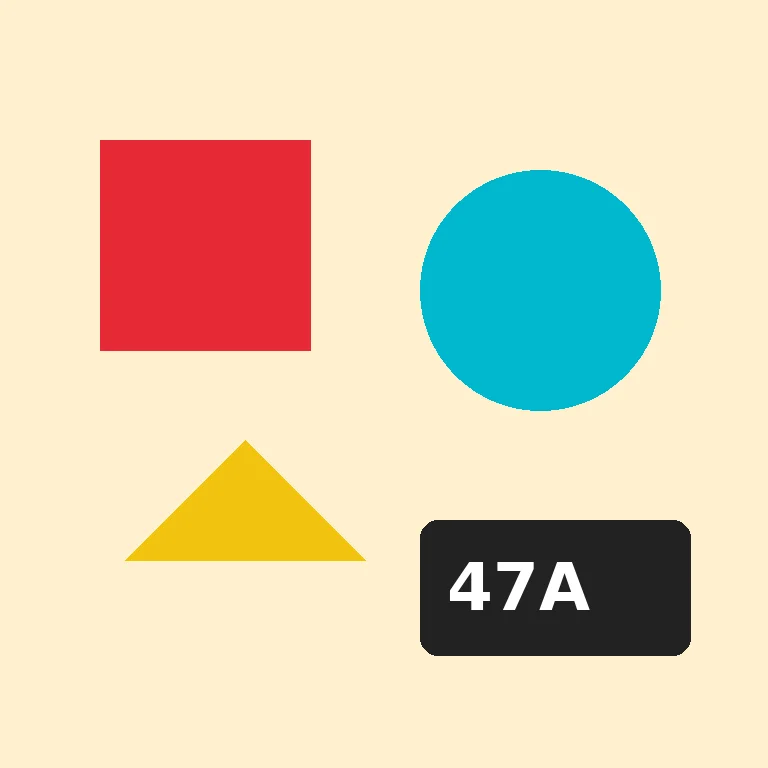
Reference input for the editing test.
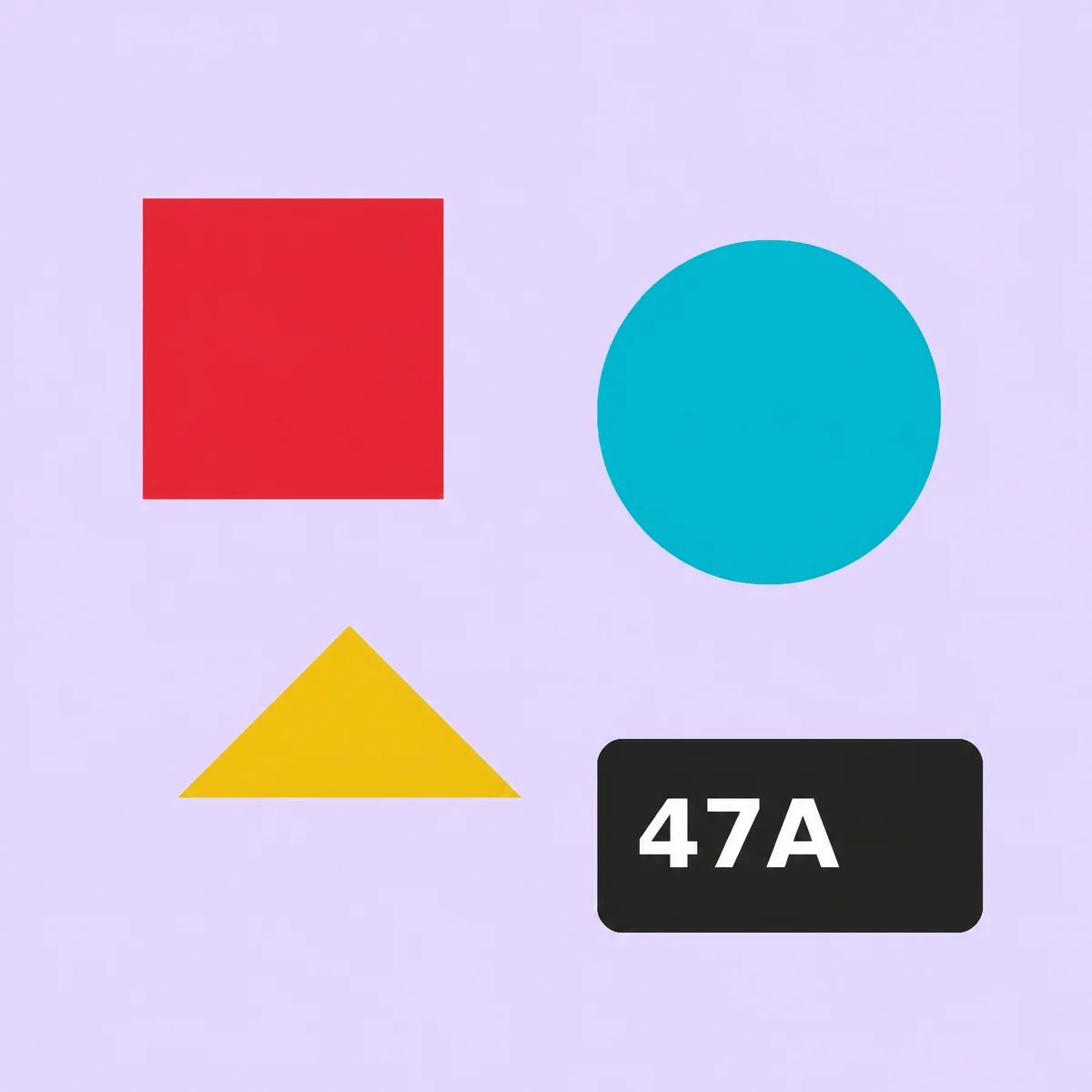
Sunburst reference-image edit, September 9, 2026. The instruction requested a background change while retaining shapes, colors, positions, and text. Inspect outputs against your own acceptance criteria before using them in production.
Is GPT-Image-2.5 available on APIMaster?
Yes. Open Flare's model detail page or Sunburst's model detail page. Each selects the corresponding model, displays its resolution prices, and supports generating an image or uploading a reference for image-to-image editing after signing in.
Our September 9 production acceptance run passed 24 API cases across both models and returned 30 images. Coverage included generation, multipart and JSON reference-image editing, 2K and 4K tiers, asynchronous requests, and multiple-image results. The integration tests confirm the tested request paths and outputs; they are not a model-identity fingerprint certification, a quality benchmark, or a guarantee of future uptime.
For ongoing integrations, check the GPT Image model page, image API documentation, and image model comparison. Start with one image, verify that the returned asset meets your requirements, then increase request volume within your account's limits.
FAQ
What is the GPT-Image-2.5 API model name?
Use gpt-image-2.5-flare or gpt-image-2.5-sunburst. OpenAI documents these as two separate API models. Flare and Sunburst are not values for the quality parameter.
How much does GPT-Image-2.5 cost?
OpenAI's standard rates for both models are $5.00 per million text input tokens, $1.25 for cached text input, $8.00 for image input, $2.00 for cached image input, and $30.00 for image output. APIMaster separately displays $0.25, $0.30, and $0.60 per image for its 1K, 2K, and 4K channel tiers as of September 9, 2026; account adjustments may apply.
Is GPT-Image-2.5 available through the API?
Yes. OpenAI's September 8, 2026 release record confirms both models for generation and editing through the Image API and the Responses API image generation tool. Direct access depends on your API organization; verification may be required.
What is the difference between Flare and Sunburst?
OpenAI recommends Flare for most applications and fast everyday image generation. Sunburst targets more precise editing and premium creative work, with longer generation times. They share token rates, but the cost of a particular image can differ because token usage differs.
Does APIMaster support GPT-Image-2.5 image-to-image editing?
Yes. Both models support the tested multipart upload flow at /v1/images/edits, and both are selectable in the online image playground. The current channel does not support uploaded masks; consult the live route before relying on additional options.
Can I use ChatGPT Sketch or templates as API parameters?
No such API parameters are established by the ChatGPT launch announcement. Sketch, templates, image comments, and prompt sharing describe ChatGPT product features. Use the documented image inputs and request fields for API integrations.
Sources
- OpenAI: Introducing ChatGPT Images 2.5
- OpenAI API changelog: September 8, 2026
- OpenAI image generation and editing guide
- OpenAI API pricing
- APIMaster live model marketplace
- Qwen-Image-2.1 status: open weights, no API, non-commercial licence
Official documentation and APIMaster availability were checked on September 9, 2026. Prices and access can change; use the linked live sources when making a purchase or integration decision.