
Doubao-Seed-2.1-pro, Doubao-Seed-2.1-turbo and Doubao-Seedream-5.0-pro Are Live on APIMaster.ai
Use Doubao Seed 2.1 Pro for complex coding, Turbo for scalable agents, and Seedream 5.0 Pro for image editing. Compare features, API access and APIMaster prices.
Published 2026-09-14
Doubao-Seed-2.1-pro, Doubao-Seed-2.1-turbo and Doubao-Seedream-5.0-pro are now available on APIMaster.ai. As of September 14, 2026, developers can access all three with one APIMaster API key: choose Pro for complex coding and agent tasks, Turbo for a balance of quality and cost at scale, and Seedream 5.0 Pro for image generation, precise editing and transparent layer decomposition. Create an account to get started.
The Seed 2.1 family understands text, images and video and produces text. Seedream produces images. Together, they let a team plan a product, build its application and create its visual assets through the same API platform.
APIMaster price check, 2026-09-24: The table compares the official list price, current APIMaster price, active routes, and model card. Prices change; use the live marketplace card as the source of truth.
| 模型 ID | 原价(每 1M 输入 / 输出) | APIMaster 当前价格 | 活跃路由 | 折扣 | 模型卡 |
|---|---|---|---|---|---|
gpt-6-astra |
$10 / $50 |
$0.4915 / $2.4577 |
13 | 95% off | 查看折扣 |
GPT Trial(GPT-6 Astra, GPT-6 Sol, GPT-5.6, GPT-5.5, gpt-5.6-luna, gpt-5.6-sol, gpt-5.6-terra, gpt-6.1-sol, gpt-6-astra, gpt-6-sol, and gpt-6-luna available)
Sign up and claim a $20 GPT trial
Which Doubao model should you choose?
| Model | Main strength | Useful starting point | API model ID |
|---|---|---|---|
| Doubao-Seed-2.1-pro | Complex coding, autonomous planning and extended agent workflows | Repository changes, debugging and demanding multimodal analysis | doubao-seed-2-1-pro-260628 |
| Doubao-Seed-2.1-turbo | Quality and cost balance for scalable applications | Repeated development tasks, assistants and production agent workflows | doubao-seed-2-1-turbo-260628 |
| Doubao-Seedream-5.0-pro | Controllable image creation and editing | Product visuals, posters, reference-image fusion and editable layers | doubao-seedream-5-0-pro-260628 |
These roles follow Volcengine's official model descriptions. A useful application pattern is to use Turbo for routine work, evaluate Pro on the hardest tasks, and call Seedream when the deliverable is an image.
Doubao-Seed-2.1-pro: from coding assistance to engineering delivery
Volcengine positions Seed 2.1 Pro for high-complexity tasks and production work. Its stated improvements cover the development cycle from understanding a repository and changing code to testing and repairing the result.
- Longer engineering workflows: stronger requirements understanding, planning and sustained implementation across repository-level tasks.
- Agent execution and recovery: better support for tool use, fallback plans after tool failures and third-party command-line tools.
- Multimodal reasoning: more detailed image and video understanding, including event progression, comparisons across images and consistency across viewpoints.
- GUI task handling: the official description covers multi-step workflows across desktop, mobile and web interfaces. Your application still supplies the tools and execution environment.
The official catalog lists a 256k-token context window, deep thinking, function calling and structured output. It recommends json_schema for Pro's structured output. The context window is a shared budget, not a promise of a full 256k input plus another 256k output in one request.
For developers, the practical opportunity is to give Pro a complete task with repository context, acceptance criteria and tools, then evaluate the resulting implementation. The improvements above are vendor descriptions, not an APIMaster comparative benchmark.
Doubao-Seed-2.1-turbo: the Seed workflow at a lower token cost
Seed 2.1 Turbo targets scalable production with a balance of quality and cost. It shares the family's emphasis on coding, agent execution and multimodal understanding, and the official catalog also lists a 256k-token context window, deep thinking, tool calling and structured output.
Turbo is a practical starting point for repeated code assistance, information extraction, internal assistants and agent workflows where token spend accumulates across many calls. At the APIMaster channel prices checked for this article, Turbo's input and output rates are approximately half Pro's rates.
Both Seed models expose thinking controls. Volcengine documents minimal, low, medium and high reasoning levels, with high as the default and minimal disabling thinking. The Chat API also documents thinking.type: "disabled". Choose the level for the task and compare completion quality, total token use and latency on your own workload.
Doubao-Seedream-5.0-pro: precise editing and reusable layers
Volcengine describes Seedream 5.0 Pro around three improvements: more controllable editing, more practical production workflows and more natural results. Its model page highlights instruction following, infographics, additional languages, interactive editing and reference-image fusion.
Create images and combine references
Use text prompts for product visuals, posters and illustrations, or supply up to 10 reference images for image editing and fusion. This is useful when a design must combine a product, a layout and a visual reference in one output. Generation supports 1K, 1.5K and 2K resolution tiers.
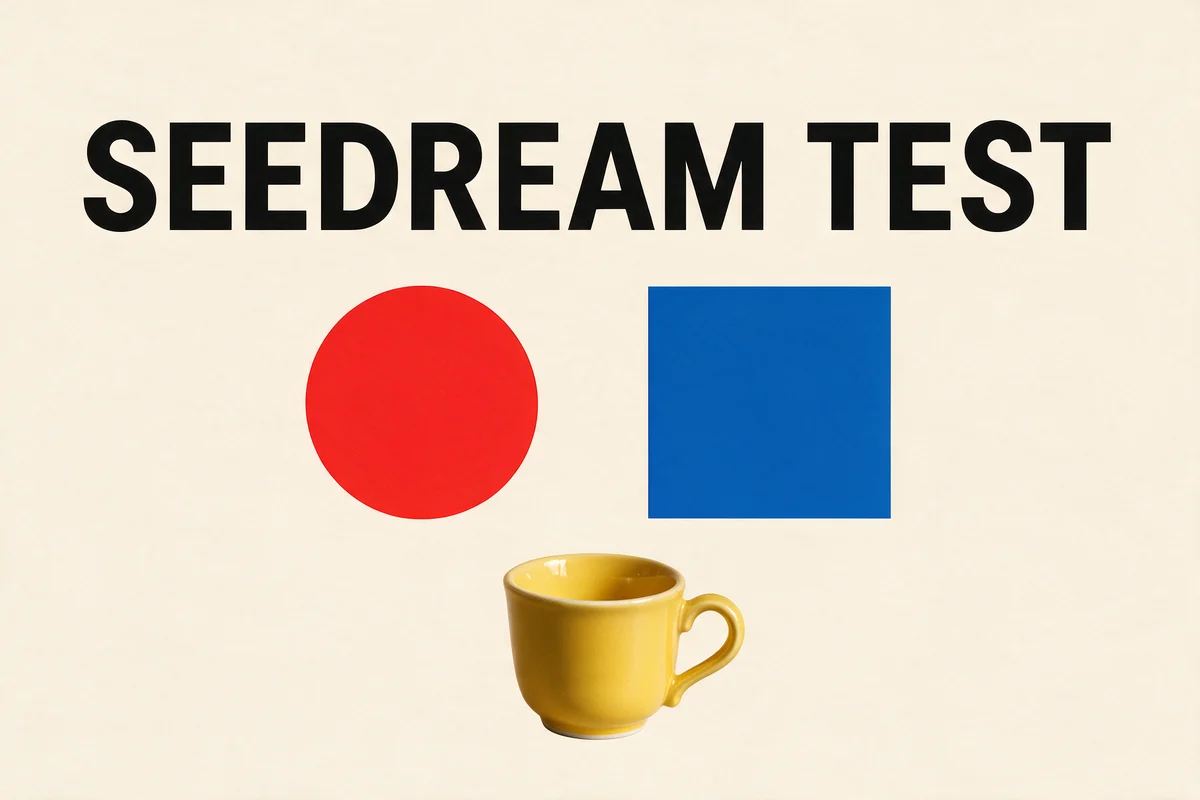
APIMaster sample, September 14: a two-reference editing request combined a poster with a separate yellow-cup image. The result retained the SEEDREAM TEST heading, red circle and blue square, and added the cup below them. This is an actual returned image from our integration test.
Edit a specific area or separate a design into layers
The official API supports editing instructions that identify a location with coordinates, a box or an arrow. This gives designers a more precise way to request a local change while describing what should remain intact.
Layer decomposition turns one source image into one base image plus up to 16 separate layers. The non-base layers are transparent PNGs. Returned metadata includes layer order, names and bounding boxes, so an application can position the elements back on a canvas.
Our decomposition tests returned a base image and separate square, circle and title layers, and we verified the transparent alpha channels. We also tested editing a separated transparent layer. These checks demonstrate the tested workflow; a design's complexity will affect its results.
Use the synchronous /v1/images/generations endpoint for generation, editing and decomposition. Decomposition accepts exactly one input image. Seedream 5.0 Pro currently does not support streaming, group-image generation or web search; multiple references still produce one edited image. See the Seedream API guide for parameters and layer reconstruction.
What does the Doubao API cost on APIMaster.ai?
The following are APIMaster listed channel/base prices in USD, checked September 14, 2026. They are not a currency conversion of an official CNY invoice. Your account group multiplier and the selected route determine the effective charge; check the live marketplace and your usage log.
| Text model | Input per million tokens | Output per million tokens |
|---|---|---|
| Seed 2.1 Pro | $0.83 | $4.17 |
| Seed 2.1 Turbo | $0.42 | $2.08 |
Seedream is billed by images, not by its token counters:
| Seedream operation | Each output at or below 2,610,000 pixels | Each output above 2,610,000 pixels |
|---|---|---|
| Image generation or editing | $0.045 | $0.09 |
| Layer decomposition, including the base image | $0.0225 | $0.045 |
The first input image is free; each additional input is $0.003. Each output is classified independently by its actual width multiplied by height. A resolution label alone does not determine the total bill.
For example, our mixed-resolution decomposition produced three ordinary layers and one higher-resolution base: 3 x $0.0225 + $0.045 = $0.1125 before multipliers. With channel multiplier 1 and account group multiplier 1.05, the charge was $0.118126 after quota rounding. The usage-log details now show the quantities, unit prices, multipliers and final charge.
Start using the three models with one API key
- Register on APIMaster.ai and open the console.
- Review the model's current channel price and availability, add credit as needed, and create an API key.
- Set your API base URL to
https://apimaster.ai/v1and copy the exact model ID from the table above. - Start with a small task, inspect the result and usage log, then connect it to your application.
For a short Seed 2.1 Turbo request with thinking disabled:
curl https://apimaster.ai/v1/chat/completions \
  -H "Authorization: Bearer $APIMASTER_API_KEY" \
  -H "Content-Type: application/json" \
  -d '{
    "model": "doubao-seed-2-1-turbo-260628",
    "messages": [{"role": "user", "content": "Outline an API for a product-image editor, including upload, editing and download."}],
    "thinking": {"type": "disabled"},
    "max_tokens": 1024
  }'
Change the model to doubao-seed-2-1-pro-260628 to compare Pro on the same task. To generate an image with Seedream:
curl --max-time 300 https://apimaster.ai/v1/images/generations \
  -H "Authorization: Bearer $APIMASTER_API_KEY" \
  -H "Content-Type: application/json" \
  -d '{
    "model": "doubao-seedream-5-0-pro-260628",
    "prompt": "A red ceramic teapot on a white studio table, clear product photograph, soft natural lighting",
    "size": "1K",
    "output_format": "png",
    "watermark": false
  }'
Read the image URL from the response's data array and download the result promptly. Upstream result URLs expire after 24 hours.
Build your coding and image workflow on APIMaster.ai
APIMaster brings these models into one account with a common API base URL, API key management and usage logs. You can evaluate Pro and Turbo alongside your existing model stack, then add Seedream for visual production without maintaining a separate Volcengine account for this integration.
Start with Turbo for everyday agent work, Pro for your most demanding coding tasks, and Seedream for image creation and editing. Explore the models or create your APIMaster account and run your first request.
FAQ
Are all three models available on APIMaster.ai?
Yes. As of September 14, 2026, APIMaster lists Doubao-Seed-2.1-pro, Doubao-Seed-2.1-turbo and Doubao-Seedream-5.0-pro. Use the exact versioned API IDs in this article and check current route availability before use.
How do Seed 2.1 Pro and Turbo differ?
Volcengine positions Pro for high-complexity tasks and Turbo for scalable production with balanced quality and cost. Both support deep thinking, multimodal understanding, tool calling and a 256k context window. APIMaster's listed Turbo token rates are approximately half Pro's.
Does Seed 2.1 generate images?
Seed 2.1 Pro and Turbo accept text, images and video and produce text. Use Seedream 5.0 Pro when you need generated or edited images.
Can Seedream separate an image into editable layers?
Yes. Submit exactly one image with layer_decomposition: true. The model can return one base image and up to 16 transparent PNG layers, together with positioning and layer-order metadata.
Is every Seedream request a fixed $0.045?
No. $0.045 is the base price for one ordinary generation or editing output. The total depends on the operation, each output's pixel count, paid reference inputs and applicable multipliers. Layer decomposition has separate per-image prices, and the base image is also billable.
Do I need a separate Volcengine API key?
For requests sent through APIMaster, use your APIMaster API key and https://apimaster.ai/v1. The request body and endpoint depend on whether you are calling a Seed text model or the Seedream image model.
Sources and related guides
Official model capabilities and APIMaster availability and prices were checked on September 14, 2026.